Why the Same Film Can Have More Than One Cut
Why the same film can have more than one cut: learn how editing choices shape a viewing and decide which version fits your purpose.
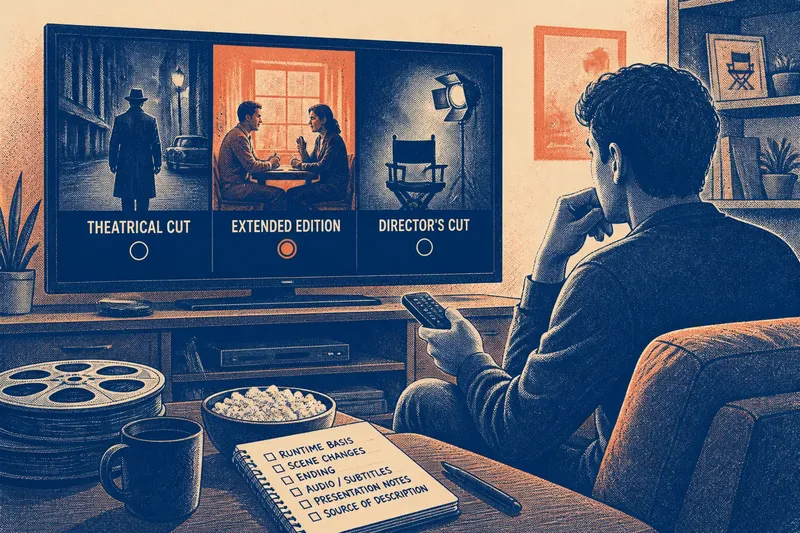
You open a film’s playback menu and find a theatrical cut, an extended edition, and a director’s cut. The names hint at differences but do not tell you what changed. Why the same film can have more than one cut comes down to editing choices: scenes can be removed, rearranged, or expanded, changing the rhythm and emphasis of the story.
What a cut changes
A cut is a particular arrangement of a film’s shots, scenes, and sounds. Editors decide what the audience sees and when. A pause may be shortened, a scene moved, or a new ending substituted. Music and other audio can also differ.
Think of each cut as a route through the same neighborhood. One route passes a landmark; another skips it. The destination may be similar, but the journey—and what you notice along the way—changes.
Different cuts can come from distinct creative decisions or release contexts. A cinema version may be followed by a home edition with a different arrangement. A filmmaker or studio may present an alternate edit, and a distributor may prepare a version for a particular market or format. A difference does not, by itself, mean one version is defective.
Why edits differ
There is no single reason for every alternate cut. A version may be adjusted to change the pace, reflect a creative preference, or meet a release requirement. Material may also be added later when usable picture or sound elements are available.
“Restored” and “uncut” describe different things. Restored generally refers to work on picture or sound elements. Uncut suggests that material absent from another version is present. Neither term alone tells you whether the story was re-edited or whether the version reflects a filmmaker’s preferred arrangement.
Classification labels are another separate matter. “Unrated,” for example, refers to release classification in some markets; it does not necessarily mean the film has a longer or different cut.
What labels mean
“Theatrical cut” usually identifies a version associated with a cinema release. “Extended edition” signals added material, but that material might be inserted into the feature or presented separately. “Director’s cut” presents an edit as the director’s version, but the label does not explain the changes or who approved them.
“Special edition” may describe a package of extras rather than an alternate cut. A listing’s title can also be broad while its playback menu or edition notes identify a specific version. Treat labels as clues and look for a description of the edit itself.
Check whether the stated runtime applies to the feature or includes an overture, intermission, introduction, or bonus material. A difference in displayed duration may reflect presentation details rather than added scenes.
How do cut differences affect viewing?
Does a longer runtime mean added scenes?
Not necessarily. Credits, presentation details, or an intermission can affect the displayed duration. Look for notes that identify added scenes or explain how the versions differ.
Is the director’s cut always preferred?
No. The label identifies how the edition is presented, not which edit every viewer should choose. You might prefer a tighter version, or want to see the director’s alternate choices.
Can two cuts have similar runtimes?
Yes. One scene can be shortened while another is expanded, or scenes can be replaced or reordered. A runtime cannot show the shape or emphasis of an edit.
Why might a streaming version differ from a disc?
A service and a disc release may offer different editions or territory-specific versions. Compare the edition descriptions where available instead of assuming every platform carries the same cut.
Compare the edit itself
Focus on what changes in the feature, not on which label sounds most authoritative. Use these checks to decide what to watch next:
- Named cut: If the menu names a theatrical or alternate cut, choose it when that specific version is your goal; if it gives only a broad label, look for edition notes before deciding.
- Runtime basis: If the duration includes an intermission or bonus segment, do not treat the difference as proof of added story; if the feature runtime is stated separately, compare that instead.
- Scene description: If notes identify inserted, deleted, or rearranged scenes, choose according to whether you want those changes; if no scenes are described, avoid inferring them from the title.
- Ending: If an alternate ending is mentioned, choose the familiar release version for continuity or the alternate version to see that variation; if the ending is not described, do not assume it changed.
- Audio and subtitles: If the language tracks or subtitles meet your needs, proceed with that edition; if they do not, select another available presentation, since these options do not establish a different cut.
- Presentation notes: If the listing names a format, aspect ratio, or restoration, treat that as information about presentation; if it says nothing about editing, do not infer that the cut changed.
- Source of the description: If edition notes come from the distributor or playback menu, use them to identify the cut; if a retailer uses vague promotional wording, seek clearer details or choose a version whose cut is named.
For a worked hypothetical, imagine you want to watch a concise version for a first viewing. A menu lists a theatrical cut and an extended edition; the latter’s notes say it adds a character scene, while both options provide the same language track. You choose the theatrical cut because you prefer the shorter presentation. The observable result is that the added character scene is absent; if you later want that context, choose the extended edition instead.
Choose for your purpose
If you want the edit associated with a cinema release, choose a clearly identified theatrical cut. If you want additional story material or a later creative revision, look for notes that say what the edition changes. When the listing is vague, use the playback menu and feature-specific runtime, but do not treat either as a complete account of the edit.
For a deliberate comparison, watch each cut separately. Note a changed scene or moment, then observe whether the difference affects pacing, characterization, or the weight of a later scene. Separate viewings make those effects easier to notice than switching versions mid-scene.
When details are missing
A release may say “special edition” without explaining whether the feature itself changes. Look for a named cut in the playback menu, a feature-only runtime, or notes about the edit. If none is available, treat the version as unclear rather than guessing from the cover or bonus-feature list.
Why the same film can have more than one cut is ultimately a question of choices: what to include, where to place it, and how to shape the viewer’s attention. Before pressing play, check the edition notes and decide whether you want a familiar release, added context, or an alternate arrangement. That small distinction helps you choose the viewing experience you actually intend.